
Fashion Design Clothes: Sketch
Smartmove GlobalArt & Design
4.645.00 Reviews
- Version
- 3.2.2
- Installs
- 1.00M
- Age Rating
- Teen
Screenshots
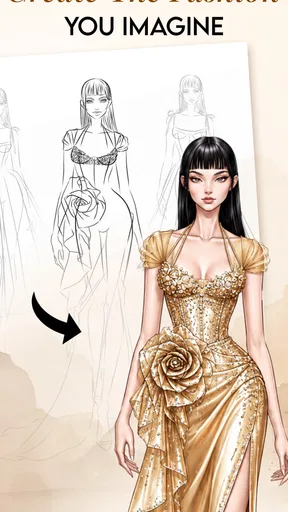
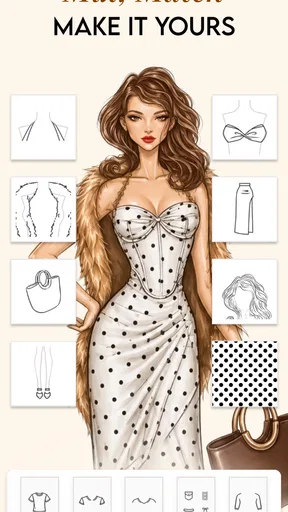
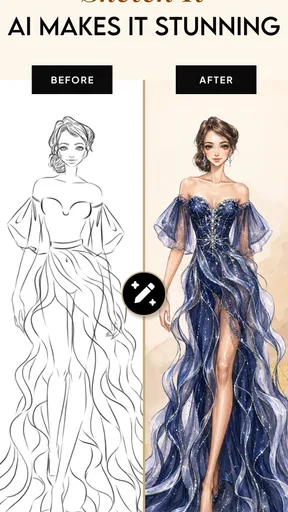
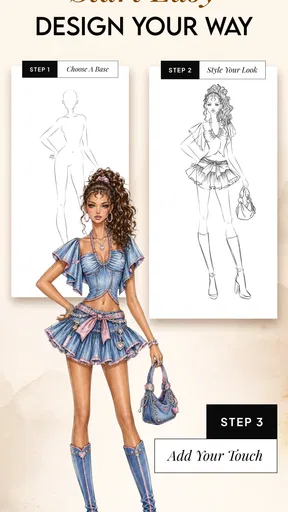
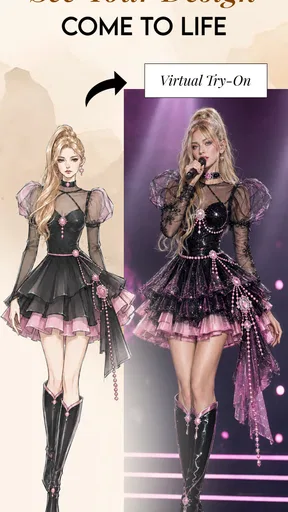
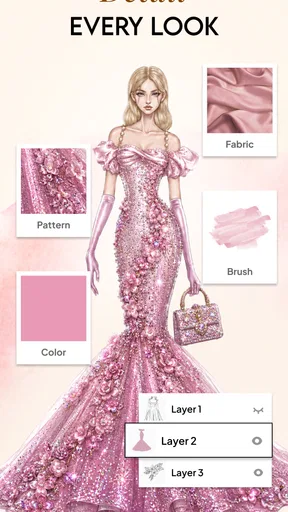
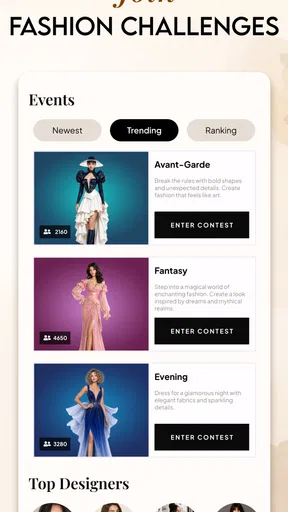
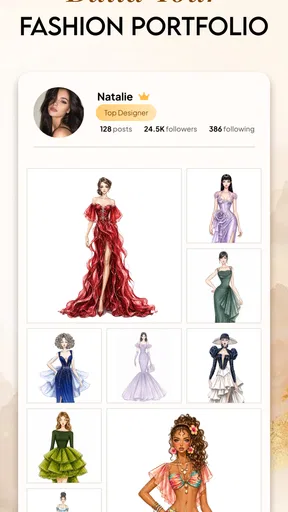
Our Review of Fashion Design Clothes: Sketch
 Analysis by Appyee
Fashion Design Clothes: Sketch is the kind of art and design app I would suggest to someone who wants to explore clothing ideas without starting with a blank sheet of expensive paper, a full fashion course, or a complicated desktop program. I used it as a quick fashion sketchbook, and my main impression is that it works best as an idea-generation tool: you can turn a vague outfit thought into a visible concept, adjust the direction, and decide whether the design is worth developing further.
The app comes from Smartmove Global and sits in the Art & Design category. Its focus is narrow in a useful way: clothing, outfit concepts, and fashion drawing rather than general illustration. That specialization makes a difference when I am thinking about a sleeve shape, a dress silhouette, or a color combination instead of trying to create an all-purpose digital painting. It is free to install, with optional in-app purchases ranging from $1.99 to $35.99 per item, so the sensible approach is to try the basic experience first and only spend money if it genuinely fits your workflow.
How I would decide whether this fashion sketchbook fits
Before choosing it, I would ask what kind of result I need. If I want quick visual exploration, Fashion Design Clothes: Sketch is a convincing option. If I need production-ready technical drawings, accurate garment measurements, pattern construction, or a professional portfolio workflow, I would be more cautious. The app is designed around fashion ideas, not a replacement for specialized apparel software or a traditional design education.
That distinction is important because a visually attractive outfit concept and a usable garment specification are two different things. A sketch can communicate mood, proportions, and styling while still leaving out seam placement, fabric behavior, construction details, and sizing information. I found the app more valuable when I treated each result as a conversation starter or design draft rather than as a finished manufacturing document.
The app is also aimed at people who enjoy working visually. Beginners can use it to test ideas without knowing every rule of fashion illustration, while more experienced users may appreciate the speed of creating several directions before choosing one to refine elsewhere. I would not choose it solely because it has artificial intelligence in its description. The real question is whether its assisted approach helps you think faster without making every concept feel too similar.
Its audience includes students, hobby designers, stylists planning a look, content creators preparing fashion posts, and anyone who keeps outfit ideas in their phone. It may also suit a small clothing brand that needs rough mood-board material during an early discussion. For a professional designer, however, it is better viewed as a portable ideation layer than as the central design system.
What I look for during the first session
My first test with an app like this is not whether it produces an attractive image immediately. I look at how much control I retain over the idea. Can I describe a specific garment clearly? Can I compare a casual variation with a formal one? Can I keep a useful concept from becoming an unrelated fashion image? Those questions matter more than a single impressive result.
I also pay attention to how much effort is required before the output becomes useful. A good mobile sketchbook should help me capture an idea while it is fresh. If I have to prepare a long, perfectly worded instruction every time, I am less likely to use it during a busy day. Fashion Design Clothes: Sketch is most appealing when I use it for short creative sessions rather than expecting a complete collection from one sitting.
A practical starting method is to describe one garment, one wearer context, and one visual priority. For example, I might begin with a relaxed weekend jacket, a clean silhouette, and a limited color direction. After that, I would change only one element at a time. This makes it easier to tell whether a new result is better because of the cut, the material impression, or the styling rather than simply being different.
Where the app wins over a blank canvas
The strongest advantage is speed. A blank canvas asks me to solve pose, proportions, clothing structure, and presentation at once. A fashion-focused app narrows the problem. Instead of wondering how to begin, I can concentrate on the character of the outfit. That reduction in friction is especially helpful when I have a half-formed idea that would otherwise disappear before I open a more advanced drawing tool.
It is also more approachable than a full digital illustration setup. A general drawing app can be excellent, but it often requires me to build the fashion workflow myself with brushes, layers, references, and templates. Fashion Design Clothes: Sketch is more direct for the specific task of imagining clothes. I spend less time configuring a workspace and more time comparing design directions.
Another useful strength is its role in visual communication. When I tell a friend that I am imagining a loose top with a sharper shoulder line, words can make the idea sound vague. A quick sketch gives us something concrete to discuss. The same applies when planning an outfit for an event: I can explore whether the overall impression should be minimal, dramatic, playful, or formal before buying anything.
The best use of this app is rapid comparison, not final technical drafting. That single expectation keeps the experience satisfying. I can create a few related concepts, identify the one with the strongest silhouette, and then move the chosen idea into a more precise tool if necessary.
Three workflows that make it more useful
My first recommended workflow is the “three-direction” test. I start with one basic clothing idea and make three versions: a safe version, a bolder version, and a practical everyday version. The point is not to keep all three. It is to reveal which part of the concept actually matters. Sometimes the bold version exposes a shape I like, while the practical version shows how to make it wearable.
The second workflow is to separate silhouette from decoration. I first focus on the outline of the garment and ignore small details. Only after the shape feels right do I explore color, texture, or styling cues. This prevents surface decoration from hiding a weak structure. It is a particularly helpful habit for beginners, because an attractive color combination can make an awkward proportion seem better than it is.
The third is to use the app before shopping. If I want a new outfit, I can sketch several combinations around pieces I already own. That helps me decide whether I need a genuinely new garment or simply a different layering idea. In everyday use, this can save more time than generating random fashion concepts, because the result is connected to a real decision in my wardrobe.
I would also keep a short written note beside each saved concept, even if the app itself is primarily visual. I might record the intended occasion, the fabric feel I imagine, or the feature that must not change. Without that note, similar sketches can blur together after a few sessions. The image shows the direction, but the note preserves the reason I liked it.
How it compares with familiar alternatives
Compared with pencil and paper, this app is faster for experimentation and easier to revise conceptually, but paper still feels better for spontaneous marks and personal drawing style. If you already sketch confidently by hand, the app may not replace your notebook. It can still be useful as a second stage for exploring variations when you want a more polished visual prompt.
Compared with a general drawing app, the fashion specialization is the main attraction. A general tool usually offers broader control, but that flexibility can slow down a person who only wants to explore clothing. On the other hand, an experienced illustrator may prefer the general app because it gives finer control over anatomy, line quality, layers, and final presentation.
Compared with professional fashion design software, this is a lighter and more accessible choice. Professional tools are normally the better destination for technical flats, repeatable measurements, construction planning, and production communication. Fashion Design Clothes: Sketch makes more sense earlier in the process, when the question is “Which direction should I pursue?” rather than “How do I manufacture this garment accurately?”
Compared with browsing inspiration boards, the app is more active. Looking at other people’s outfits can help establish a mood, but it can also keep me in a passive collecting loop. Creating a concept forces me to make decisions about shape and styling. The trade-off is that the app may not provide the same breadth of real-world references, so I would still use external visual research when I need historical, cultural, or material accuracy.
Limitations I noticed in the decision
The biggest limitation is the gap between an appealing concept and a dependable design specification. If I were preparing instructions for a sample maker, I would need another process to clarify dimensions, construction, fabric weight, closures, and finishing. The app can help me communicate the look, but I would not rely on it alone for the details that determine whether a garment can actually be made as imagined.
There is also a creative trade-off in assisted generation. Speed can introduce sameness. If I use broad prompts and accept the first attractive result, I may end up with a fashionable image that does not express a distinct idea. I get better value when I revise deliberately, compare alternatives, and reject outputs that look polished but ignore the original brief.
The free entry point is welcome, but the presence of paid items means I would pay attention before committing to a regular workflow. A casual user may never need to spend anything. A frequent user should decide whether the available paid options improve control or simply encourage more experimentation. I would make that decision after testing the free experience rather than assuming every purchase is necessary.
The Teen content rating is another reason I would consider the intended audience and setting. It is not a concern for ordinary fashion ideation, but parents, teachers, and younger users should still use their own judgement about the designs being created and shared. For classroom use, I would establish a clear brief and review process instead of treating the app as an unrestricted activity.
Who should switch, and who should stay with another tool?
I would switch to this app if my current method is scattered notes, screenshots, and unfinished pencil sketches. It gives those early ideas a more direct visual form and can make a short creative session feel productive. It is especially worthwhile for someone who often thinks, “I know the mood I want, but I cannot picture the outfit clearly enough to explain it.”
I would not switch if my main requirement is exact technical control. A designer already working comfortably in a dedicated illustration or apparel program may gain more from keeping that tool and using this app only when speed matters. Moving an established workflow has a cost: saved references, familiar shortcuts, file organization, and professional output requirements all matter. A new app should solve a real bottleneck, not merely look interesting.
For a student, I see the app as a useful bridge between inspiration and a more disciplined design process. It can help build a habit of testing silhouettes and explaining choices. I would still encourage learning to draw, observe clothing on real bodies, understand fabric behavior, and document technical details. The app should support those skills rather than replace them.
For a casual user planning a special outfit, the value is simpler. You can explore the overall direction before spending money on clothes. That is a realistic everyday scenario where the app earns its place: I might be preparing for a party, unsure whether I want a sharper monochrome look or something softer and more relaxed. A few visual trials can help me make the decision before I visit a store or assemble pieces from my wardrobe.
For a small creator, the app may be useful for turning a verbal idea into a visual post or a rough concept sheet. I would be careful about presenting sketches as finished products, though. Viewers can interpret a polished image as a promise of a real garment, so captions and communication should make the concept stage clear when the item is not yet produced.
What happens if you move away later?
The cost of switching away is relatively low if you treat the app as an idea generator from the beginning. Keep your strongest concepts organized with descriptive names and notes, then recreate the selected design in a more precise environment when necessary. This avoids building an entire professional archive around a tool that may not be intended for technical production.
The cost becomes higher if you expect the app to be your only fashion workspace. Before relying on it heavily, I would test a complete mini-project from first idea to final presentation. That test should include several variations, a chosen direction, your own notes, and whatever final format you normally need. If the last step requires too much reconstruction, the app belongs earlier in your process.
Its current version is 3.1.1, and it supports devices running Android 7.0 or later. For someone using an older compatible phone, I would pay attention to comfort during longer sessions rather than assuming that technical compatibility guarantees a smooth creative experience. Fashion sketching involves visual comparison, so a screen that makes details difficult to judge can reduce the benefit of the app even when installation is possible.
The app has built a visible audience, with over 500 thousand installs and an average rating of 4.6 from around 9.3 thousand ratings. Those figures suggest that the concept is resonating with many users, but they do not remove the need to test it against your own goals. A beginner seeking quick outfit ideas and a professional preparing manufacturing documents are evaluating completely different things.
My recommendation after using it as a decision tool
I recommend Fashion Design Clothes: Sketch to beginners, hobbyists, students, and style-focused users who want a quick way to turn clothing ideas into visual directions. I also recommend it to experienced designers as a supplementary brainstorming tool, especially when they want to explore several silhouettes before opening a more demanding program.
I would skip it as a primary choice if you need precise garment engineering, detailed pattern work, or a complete professional production pipeline. In those cases, a specialized technical tool or a carefully maintained hand-drawing workflow is likely to serve you better. The app can still contribute at the earliest stage, but it should not be asked to solve problems it was not designed to solve.
Because it is free to start, my advice is straightforward: install it, create one focused concept, try the three-direction workflow, and see whether the results help you make a real design decision. Do not judge it only by the prettiest image it creates. Judge it by whether it helps you clarify a silhouette, explain an outfit, or avoid wasting time on an idea that does not work.
In my experience, that is where its value becomes clear. It is not a substitute for drawing practice, fashion research, or technical apparel software. It is a convenient creative companion for the uncertain first stage, when an outfit exists mostly in your head and needs a visual form. If you want faster fashion ideation on a phone, this is worth trying; if you need production accuracy, keep a more specialized tool in charge.
Verdict
Strengths of Fashion Design Clothes: Sketch
- Simple tools make fashion sketching approachable for beginners.
- Useful garment templates help speed up early design ideas.
- Supports quick experimentation with colors, shapes, and outfit details.
- Works well for creating rough concepts without traditional art supplies.
- Portable design workspace lets you sketch ideas wherever you are.
Limitations of Fashion Design Clothes: Sketch
- Advanced designers may find the drawing and editing tools limited.
- Some features or content may require in-app purchases.
- Small screens can make precise detailing and adjustments difficult.
- Export options may not offer every format professional workflows require.
- The app may feel less useful without a stylus or larger display.
Similar Picks in This Category
View All
Canva: AI Photo & Video Editor
Canva4.8

PENUP – Drawing-sharing SNS
Samsung Electronics Co., Ltd.4.5

Crafto
Kutumb App4.6

Sketchbook
Sketchbook4.1

ibis Paint X
ibis inc.4.5

Adobe Express: AI Photo, Video
Adobe4.6
Frequently Asked Questions
What is Fashion Design Clothes: Sketch?
Fashion Design Clothes: Sketch is a creative mobile app for users who want to design and visualize clothing ideas. It provides a digital workspace for sketching garments, experimenting with colors, adding details, and developing fashion concepts without needing paper or traditional drawing supplies. It can be useful for beginners, fashion students, hobbyists, and anyone interested in creating outfit designs on a phone or tablet.
Do I need professional drawing skills to use the app?
No. Fashion Design Clothes: Sketch is designed to be accessible to beginners as well as more experienced creators. Users can start with basic shapes, templates, and simple drawing tools before progressing to more detailed designs. While artistic ability may help when creating complex outfits, the app is mainly focused on experimentation, so you can learn by trying different silhouettes, colors, patterns, and accessories at your own pace.
What can I create with Fashion Design Clothes: Sketch?
The app can be used to develop a variety of fashion concepts, including dresses, casual outfits, formal clothing, tops, skirts, trousers, and other garment ideas. Depending on the available tools and templates, you may also be able to add colors, patterns, sleeves, necklines, accessories, and decorative details. It is best suited to visual concept development rather than producing professional manufacturing-ready technical drawings.
Is Fashion Design Clothes: Sketch free to download and use?
The application may be available as a free download, but some features, design resources, advertisements, or advanced tools can depend on the current version and platform. Before installing, check the official Google Play Store or Apple App Store listing for pricing, in-app purchases, subscriptions, and supported devices. Reviewing these details is important if you want access to the complete design experience without unexpected limitations.
Can I save or share the fashion designs I create?
The app is intended to let users keep and present their fashion concepts, although the exact saving and sharing options can vary by device and app version. Look for export, save, gallery, screenshot, or sharing functions after completing a design. If you plan to use your sketches for a portfolio or school project, confirm the available image quality, file format, and usage terms before relying on the app.
